Smart Office — Real-time IoT Dashboard with Floor Plan, MQTT & WebSockets
Most smart office dashboards feel like glorified control panels: you click a button… and hope something happens.
For this project, I wanted to build something different: a SaaS-style Smart Office platform that doesn’t just show device states, but truly feels alive — real-time synced, easy to manage, and visualized on an interactive floor plan.
This post explains what I built, how it works under the hood, and what I learned while developing it.
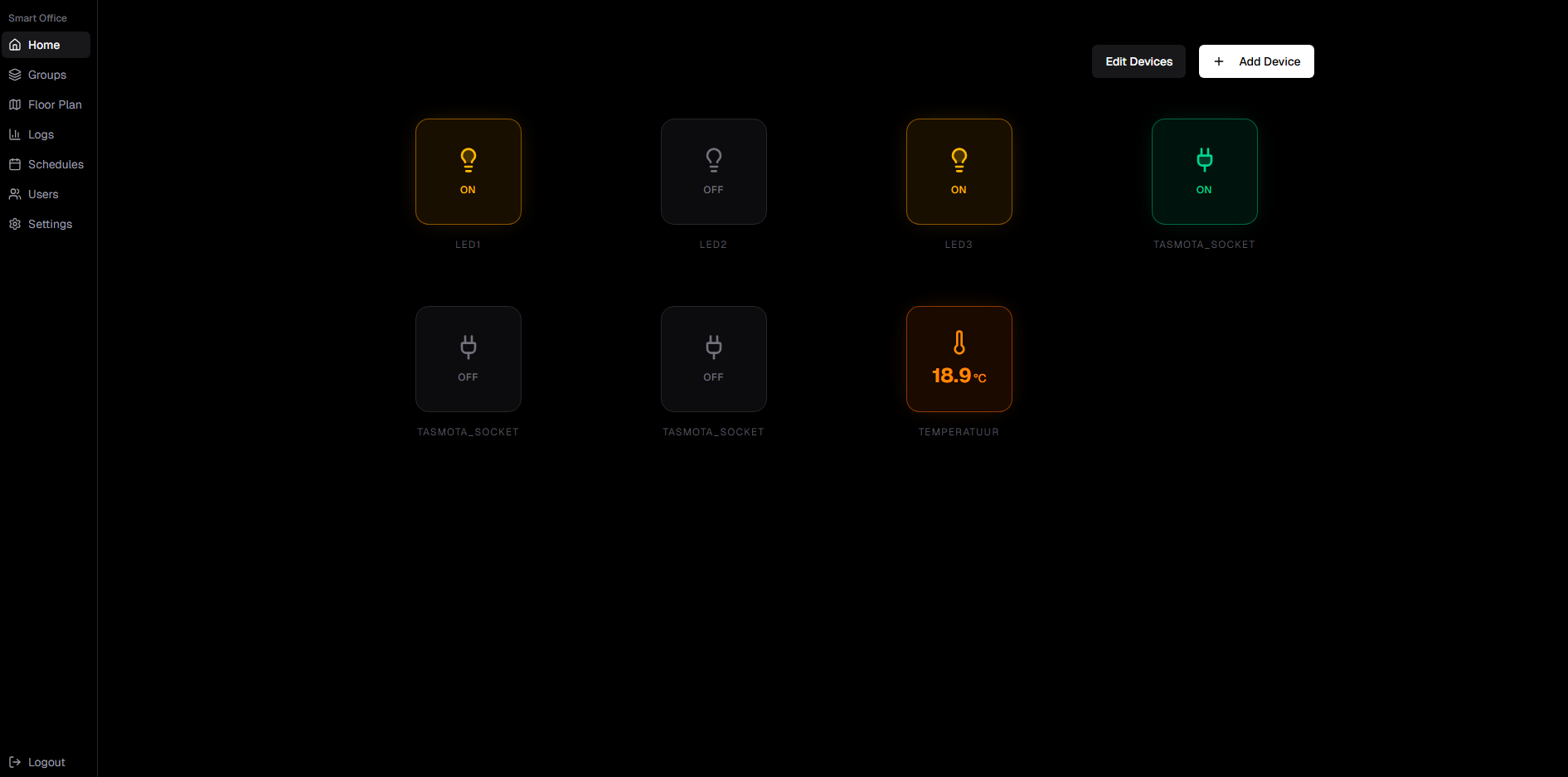
Smart Office home dashboard showing real-time device controls and sensor readings
What I built
Smart Office is a full-stack IoT platform where you can:
- Control devices like lights (toggle ON/OFF)
- View sensor readings like temperature + humidity
- Manage devices and groups via a clean UI
- Place devices on a Floor Plan (visualization)
- Track everything via Logs (activity + readings)
- Schedule actions automatically (timed triggers)
- Control access using Users + Roles
- Connect real devices through MQTT + an IoT edge layer
The goal was to make something that feels like a real product: not just a demo screen, but an actual system you could install and use.
Why I built it
This project was built as part of a school research project. The central research question was:
"How can Next.js and a tRPC-based API be used to develop a robust and performant real-time dashboard that allows users to collaborate on managing smart devices in an office building?"
This gave me the opportunity to combine multiple areas I enjoy working in:
- modern web UI (Next.js)
- real-time systems (WebSockets)
- IoT communication (MQTT)
- database modeling (Prisma + MongoDB)
- system design and architecture
And importantly: I wanted it to be beginner-friendly and usable, not only technically correct.
System architecture (high-level)
The project is built as a layered system:
1) UI layer (Next.js dashboard)
The user interacts with a dashboard containing pages like:
- Home / Dashboard
- Devices
- Groups
- Floor Plan
- Logs
- Schedules
- Users / Roles / Settings
The UI updates immediately as events happen (device toggles, sensor updates, logs).
2) Central backend layer (Node.js + Prisma)
The backend handles:
- database operations
- role-based access control
- device metadata
- schedules
- logs storage
- real-time updates to the UI
3) Real-time layer (WebSocket server)
Instead of forcing the frontend to constantly refresh, changes are pushed instantly.
Whenever something changes (device status / new reading), clients update in real-time.
4) IoT layer (MQTT broker + bridge)
To talk to real devices, I integrated MQTT:
- devices publish readings and statuses
- the server publishes control commands
- the MQTT bridge translates between MQTT messages and the app state
5) Database (MongoDB)
All state and history is stored in MongoDB via Prisma:
- users & roles
- devices & groups
- logs (events + readings)
- schedules
The "Digital Twin" concept — Floor Plan visualization
One of the features I'm most proud of is the Floor Plan view.
Instead of listing devices in a boring table, you can:
- create a floor / level
- draw or upload a floor plan (SVG)
- place devices/groups visually on the map
- control them directly from the layout
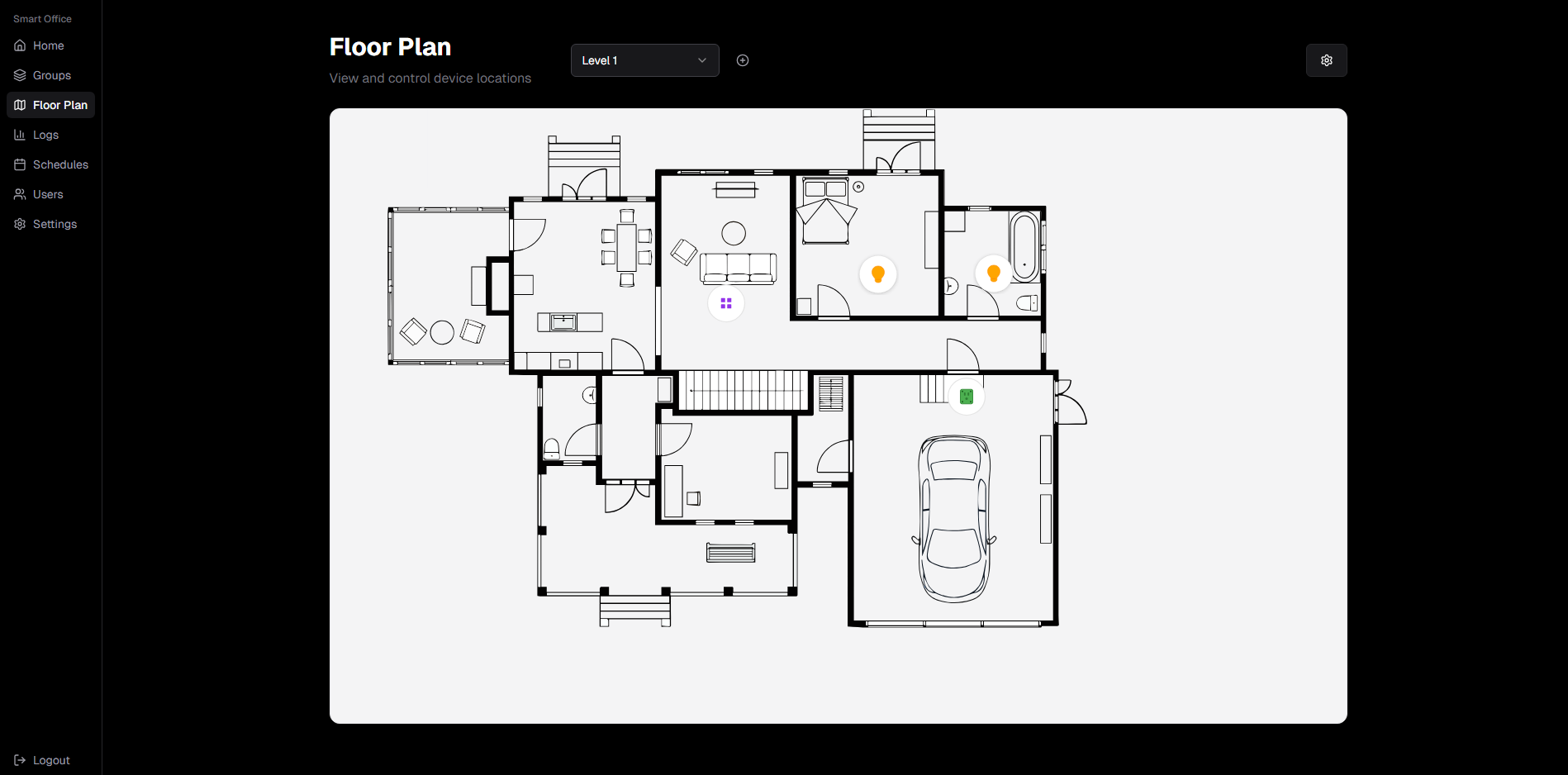
Interactive floor plan with device placement and real-time control
That makes the UI feel like a digital representation of a real office space, which is exactly what a Digital Twin should be.
It's also a UX upgrade: users immediately understand where things are.
Real-time sync: making the system feel "alive"
The platform uses WebSockets so the UI updates instantly.
Examples:
- toggle a light → the UI updates + an event appears in Logs
- a sensor publishes new readings → dashboard tiles update live
- changes made in one browser are reflected in others
This sounds “simple”, but it’s one of the hardest parts to get right:
- you need consistent state
- you need predictable events
- you need to avoid UI desync bugs
- you need logs that reflect truth, not “optimistic UI lies”
I spent a lot of time making sure the system behaves the same every time, even when things disconnect or reconnect.
Roles & permissions (a real-world requirement)
In real buildings, not everyone should be able to do everything.
So Smart Office includes:
- User roles (Admin / Level 1 / Level 2 / User)
- Allowed Roles per device
- ability to create custom roles
This matters because it forces the platform to behave like a real system: access control isn’t optional in production.
Scheduling automation
Users can schedule actions like:
- turning on lights at a specific time
- running device commands later
This adds real business value because automation is often the main reason people want “smart” systems in the first place.
Logs: observability and debugging
A big problem with IoT systems is that when something goes wrong… you don’t know why.
That’s why Logs are part of the product, not an afterthought.
Logs show:
- type (DEVICE / SENSOR)
- source
- action/event name (toggle, reading, etc.)
- value changes (OFF → ON)
- time of event
This makes debugging much easier and makes the whole platform more trustworthy.
Challenges I ran into
1. Defining the "source of truth"
In IoT you always have this question:
- is the device state coming from the UI?
- from the database?
- from the MQTT message?
- from the physical device itself?
To keep things stable, the backend acts as the consistent “brain” and publishes events to clients.
2. Keeping UI + MQTT + DB consistent
Race conditions and out-of-order updates can get messy fast.
So I designed the system around predictable events and logs, and made sure the frontend only reacts to real events.
3. Making it feel like a product
It’s easy to build a prototype that only works for the developer.
It’s harder to build something where a beginner can:
- install it on a clean PC
- open the dashboard
- understand what to do without explaining it in person
So I also wrote documentation and designed flows that make sense for real users.
What I'm most proud of
- The floor plan UX
- Real-time "reactive" feeling (WebSockets done right)
- Clean separation between UI / backend / IoT integration
- Role-based access control
- Logs + scheduling turning it into an actual usable system
What I'd improve next
If I continue this project, I’d love to add:
- device “offline” detection + health status
- dashboards per building or tenant
- more device types (dimmers, thermostats, blinds)
- historical sensor graphs
- deployment setup for production environments
Final thoughts
This project was a great mix of software engineering, system design and UX thinking.
It gave me hands-on experience with:
- full-stack architecture
- real-time systems
- IoT communication patterns
- designing something usable, not just “working”
And most importantly: it was fun to build.